
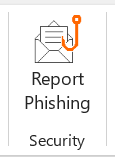
“Report Phishing” button in Outlook email
King County has an easy way to report suspicious emails which may be phishing attacks. In Outlook you should see a button in the Home tab of the ribbon bar called “Report Phishing.” Here’s what the button looks like in the top ribbon (if you don’t see the button, try changing your view settings):
 When do I use it?
Click the Report Phishing button anytime you believe the email you received is a phishing email or a potentially dangerous email. Using the Report Phishing button will send the email you report straight to our security team and Microsoft. The Report Phishing button should only be used to report emails you believe have malicious intent. If you receive spam or marketing emails, do not use the Report Phishing button. You can simply delete those emails.
How do I use it?
When you click on the Report Phishing button, a prompt will ask you if you’re sure you want to report the email as a phishing email. If you select yes, the email will be sent to the KCIT security team, and the email will be deleted from your inbox. You’ll receive a pop-up message saying “Thank you for reporting this email to the security team. No more action is required.” If you accidently report a legitimate email as a phishing email, you can find the original item in the deleted items folder in your Outlook.
Why should I use it?
King County, like other governments, constantly fights off cyberattacks. Many attackers seek usernames and passwords so they can attack private bank accounts or business government networks to install ransomware, steal data or cause outages. Reporting suspicious emails keeps King County data and files more secure. The faster our security specialists know of phishing attacks, the quicker we can defend against them. You’re an important part of the process of keeping King County safe from cybercriminals.
Thank you for your cooperation. For questions, contact the KCIT Help Desk at 206-263-4357 or submit a Help Desk ticket.






 Employee News