
King County Security Tips – “Google” yourself

With the rise of the digital age, it is difficult (if not impossible) to remain totally anonymous on the internet. Having an online presence and maintaining your social networks can be a wonderful and valuable tool, but sometimes we are unaware of how much personal information can be obtained about us over time. When was the last time you typed your name or your email address in a web search like Google or Bing? You may be shocked at the results. You may find that old photos of yourself pop up, or… Read More
King County Security Tips – WiFi? Why Not? VPN is your friend
Using free public WiFi at a coffee shop or airport hot spot is great for convenience, but bad for security. Most free access points do not make use of encryption. This is done for convenience and ease of access. If every person had to ask the barista or gate attendant for the WiFi key, it would get unruly, and no actual work would get done. Keep in mind that you are sharing those wireless airwaves with anyone that is within range of your wireless communications. There is technology out there that allows… Read More
King County Security Tips – Password safety
Creating strong passwords should be the number one priority in keeping your online world safe. Having weak passwords could result in stolen identities, loss of data or money, and even the loss of a job and/or reputation. You’ve likely heard recommendations for creating secure passwords before. Experts suggest using long, complex, and random combinations of words, letters, numbers and special characters. Follow the tips below to improve your password safety practices: Improve the strength of your passwords. Strong passwords are usually made up of at least eight characters. They should contain numbers, uppercase… Read More
King County Security Tips – Malvertising
Visit any website these days and it’s very likely that you will be viewing ads as well. Sometimes these ads can be tempting, with many offering sales, promotions, or freebies to attract more clicks. Ads on certain websites can even be targeted specifically to you based on past browsing history, making you even more likely to click! Remember this: Just because you are on a reputable, well-known website, it does not mean that the ads on the website are safe to click as well. How adspace can become infected: Advertisers do not sell their… Read More
King County Security Tips – Lock your screen
Locking your screen when you get up from your desk is a security action that is often overlooked and can have dangerous consequences. Failing to lock your screen can open you up to several vulnerabilities–some more serious than others. Although many organizations have a policy which automatically locks your screen with a screen saver after a certain amount of inactivity, not all screen savers are password-protected, leaving your workstation defenseless. Here are a few actions the bad guys can do when you leave your workstation unlocked and unattended: Files can be downloaded… Read More
King County Security Tips – HTTPS the ‘S’ stands for secure
If you have ever signed in to a website such as Facebook or Amazon, you will notice that on the login page, the URL will change from ‘http’ to ‘https’. What that little ‘s’ stands for is secure. It means that your web browser and the website have both agreed to communicate securely so that no other individuals will be able to ‘listen in’ on your conversation. If you needed to communicate some sensitive information such as a password to someone else, you would not shout out in the open ‘HERE IS… Read More
“Report Phishing” button in Outlook email
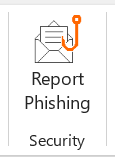
King County has an easy way to report suspicious emails which may be phishing attacks. In Outlook you should see a button in the Home tab of the ribbon bar called “Report Phishing.” Here’s what the button looks like in the top ribbon (if you don’t see the button, try changing your view settings): When do I use it? Click the Report Phishing button anytime you believe the email you received is a phishing email or a potentially dangerous email. Using the Report Phishing button will send the email you report straight to our security team and… Read More
King County Security Tips: Is that email really from HR?
One of the easiest ways the bad guys trick you into falling victim to their fraudulent scams is to exercise a sense of trust by pretending to be someone you know. More than likely, you receive emails from your Human Resources team on a frequent basis. Scammers take advantage of this constant communication by crafting spear phishing attacks using emails that spoof your HR team. Spear phishing attacks are email scams that typically target an individual or organization by spoofing, or appearing to come from a trusted sender. Don’t blindly trust emails… Read More
Cybersecurity training due Jan. 31, 2025
All employees and vendors with access to King County systems must complete Cybersecurity Training by Jan. 31, 2025. Log in here to complete your assigned training with our education partner, KnowBe4. Training takes about 60 minutes. Annual security training is an important activity that safeguards King County systems, and the number of employees who complete training each year impacts our insurance rates. Thank you for doing your part to protect King County! For assistance, contact the KCIT Helpdesk
Tech Tip: Practice good IT “hygiene” – restart your computer regularly
Did you know your computer’s operating system is updated several times a year? This update happens behind the scenes, but requires you to restart your computer. This restart can take several minutes. Your computer may offer to reschedule this required restart until later, but will only allow you to postpone once or twice – you can’t delay the update forever! Most updates include important features such as new virus protections that are critical for the safety of King County’s systems. Please practice good IT “hygiene” and restart your computer regularly! Be sure… Read More






 Employee News